Nature Photographers Network
This is the preserved archive of the original Nature Photographers Network. The community continues at naturephotographers.network.
Rough Water + 2nd
‹ PreviousLandscape GalleryNext ›

Rough Water + 2nd

by Igor Doncov

Gallery: LandscapePosted January 3, 2015215 views15 comments
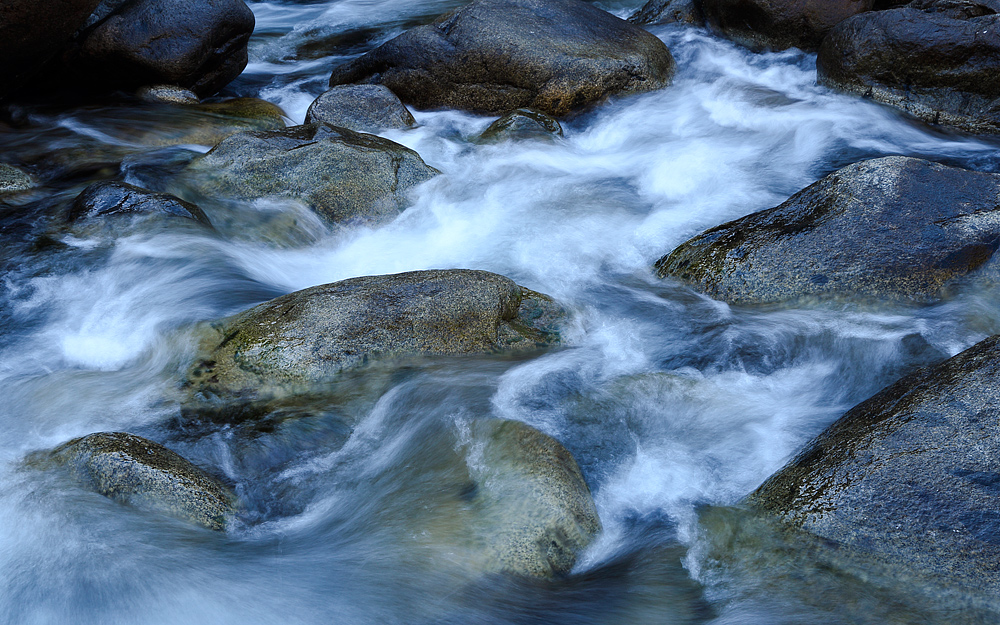
I was interested in making an image of moving water at a slow shutter speed. This was the Merced in the El Portal region during early November this year. I looked for the shady portion of the river because I didn't wish to blow out the whites, hence the bluish tinge to the image. Any recommendations on how this could be improved would be appreciated.

Canon 6D
Lens EF24-105mm f/4L IS USM
Tv(Shutter Speed) 0.3
Av(Aperture Value) 16.0
ISO Speed 100
Shooting Mode Manual Exposure
Focal Length 35.0mm
AF Mode Manual focusing

Tripod usage was kind of tricky because the rocks were round and slippery. I did some postprocessing using curves as I recall.

Comments

15 comments
Comment posted by Nancy Lea Sandy on January 3, 2015 at 10:13 PM
You can remove the bluish tint by adjusting your white balance either in camera or in post processing but I rather like it. It gives the image an abstract feel which could be enhanced by cropping to just below the dark boulder in the left corner. Lots of power in the water. A very dramatic image.
Registered on January 24, 2011, 576 Posts, 6942 Comments
Comment posted by Alberto Patiño on January 3, 2015 at 11:50 PM
Igor, I think that the bluish water works well in this particular case. But what I really like most is the contrast between the blurred moving water and the very sharp rocks. :toast:
Registered on December 2, 2014, 278 Posts, 1736 Comments
Comment posted by Igor Doncov on January 4, 2015 at 12:10 AM
Thank you Nancy and Alberto. You mentioned the contrast between sharp and blurry. Here are a few things I've learned about this type of an image. Things that improve them.

1. The composition should contain both stationary objects and moving objects to add tension.
2. The stationary objects should have good texture (and not too dark) vs moving water.
3. The best subjects are actually areas where the water is less violent, otherwise there is too much white and lack the desired sense of movement.
4. Sunny areas are poor environments for these composition due to too much contrast.

If anyone has experience on this type of image that they would like to add or correct my observations I would appreciate it.

There are some blown out whites in the water which I didn't know how to correct at the time. I'm wondering now if cloning the water near it into that space would work. What's surprising is that the histogram showed no clipping when the image was originally taken so I guess I introduced that during postprocessing (or the right edge of the histogram should have been further left on the original shot).
Registered on November 22, 2014, 189 Posts, 2733 Comments
Comment posted by Catherine Reilly on January 4, 2015 at 1:14 AM
Igor, I love shooting these scenes. What I see here looks good. I appreciate that you left the blue tones in the water, as the color is complementary to the yellowish tones in the boulders. Comp looks okay, if a bit top-heavy. A little slice off the bottom could improve that, maybe. You provide a good analysis of what makes these scenes work. And lastly, for 'hot' whites I use a couple of techniques: either burn in the area locally or use the healing brush to add some color/detail compatible with the immediately surrounding area. There a so many possible comps in these scenes that it is easy to spend a lot of time enjoying the exploration!
Registered on August 16, 2006, 603 Posts, 9192 Comments
Comment posted by Kah Kit Yoong on January 4, 2015 at 3:56 AM
Neat intimate landscape. I think you got the gist in your summary. I don't think you blew the highlights in the RAW file, I'll bet there's sufficient information in there that could be blended in. There's a few bright areas but I think they're fine as presented.
Registered on September 27, 2006, 636 Posts, 10682 Comments
Comment posted by Ian Cameron on January 4, 2015 at 7:24 AM
Fine shutter speed maintains texture in water but keeps it looking watery. The top 1/4 of the image particularly the top left corner and to a certain extent the top right feels oppressively dark and heavy. I think I would look toward lightening those corners significantly and the roof a little. Compositionally it is nicely filled with rocks with water moving between creating an interesting image throughout but perhaps one that doesn't differ enough from hundreds of similar images I have seen before.
Registered on August 6, 2004, 1125 Posts, 3318 Comments
Comment posted by Mark Seaver on January 4, 2015 at 12:42 PM
The view works well, Igor. You've got lots of good action in the water and it leads nicely from the lower left to upper right. I agree that toning down the blue would help and yes, that can be done readily both in raw or in post processing.
Registered on January 23, 2011, 1103 Posts, 17270 Comments
Comment posted by Nick Bristol on January 4, 2015 at 1:01 PM
Igor, I think you did some very nice work here. The contrast between the great looking water motion and those rocks works very nice for me. I like the blue tones of the water and love the details in the rock. Like Ian I would prefer the top to be lighter and especially in the corners. Nice work!

Nick Bristol
Lone Rock, WI
Registered on February 1, 2004, 752 Posts, 14140 Comments
Comment posted by Waleed Marhoum on January 4, 2015 at 2:36 PM
Nice image, would impact more with BW. give it a shot.
What do you think?
Registered on December 29, 2006, 85 Posts, 421 Comments
Comment posted by Igor Doncov on January 4, 2015 at 2:54 PM
Thanks Waleed. I actually like the warm rocks vs cool water composition. The warm rocks beneath the surface of the water create color brush strokes which I don't want to lose either. Thank you for the suggestion though.

Regarding the darker rocks at the top. That occurred during postprocessing when I darkened the water to emphasize those swirls. I was aware of the problem introduced but decided that the improvement was greater than the penalty. I am looking into how to burn in those rocks in a convincing manner.
Registered on November 22, 2014, 189 Posts, 2733 Comments
Comment posted by Bill Dark on January 4, 2015 at 7:20 PM
Nice work, Igor! The color balance looks fine to me, but you're the one that saw the stream and should be the one to decide. As for bringing out more detail in the rocks...I almost never use the burn or dodge tool when I want to tone an area down or bring out more detail. I would duplicate the original image, make an exposure or levels correction, then copy the duplicate file, copy and paste it on the original, then create a layer mask and brush in the correction where needed. Strength can be adjusted with the opacity slider.
Registered on May 27, 2005, 148 Posts, 1121 Comments
Comment posted by Ryan Shain on January 4, 2015 at 8:59 PM
Hi Igor,

The post processing process has taken me years to get down, and I am still figuring out the advanced blending techniques, but I can tell that Tony Kuyper's Luminosity Masks are wonderful for this kind of image. I would love to see a raw file of this image, and see where you started from.

For the image presented,
It works very well for myself with the water and rocks beautifully composed in the image. The cool and warm tones work for me. I too would like to experiment with the darks and brights to see if you would like the result a bit more than the current one.

I like it as presented, but see a bit more potential as well.

Registered on February 20, 2007, 226 Posts, 4571 Comments
Comment posted by Igor Doncov on January 4, 2015 at 11:56 PM
OK. This is the best I can do. I created a curve adjustment layer where the dark areas were lightened and then painted over the upper dark sections which lightened them up. The top left corner is still pretty dark but it turns to mud if I lighten it any further. It actually pretty dark in the original so there is little to be done about it. I much prefer having dark objects at my frame edges than light ones. I got the technique from Michael Frye's book. It's simple enough to be remembered.

Thank you for your kind offer Ryan. It probably can be done better with luminosity masks but I'm on CS3 and they're not available until CS4 as far as I know. I didn't feel good about you starting from scratch because then it becomes your interpretation and I have feelings about how it should look. Besides, I don't know how to transfer a 100MB TIF file to you.

Registered on November 22, 2014, 189 Posts, 2733 Comments
Comment posted by Igor Doncov on January 5, 2015 at 12:01 AM
I did find something interesting during this process which I wanted to share:

The bottom half of the image makes it for me. I could not come up with a composition that just included the bottom half, a composition that I liked. The reason the bottom half is more interesting is that as the water is more distant from the camera the movement is smaller with respect to the plane of the lens and therefore the swirls become less pronounced.

So the lesson is that these shots should be made as parallel to the plane of the water as possible to get the best results. Will test this out next time, I guess.

Registered on November 22, 2014, 189 Posts, 2733 Comments
Comment posted by Peter Richter on January 5, 2015 at 1:39 PM
A most appealing intimate composition to me. Your choice of shutters peed is spot on to my eye and I like the kind of metallic look to the wet rocks.

Peter
Registered on November 10, 2010, 218 Posts, 2723 Comments