
Hi Folks,
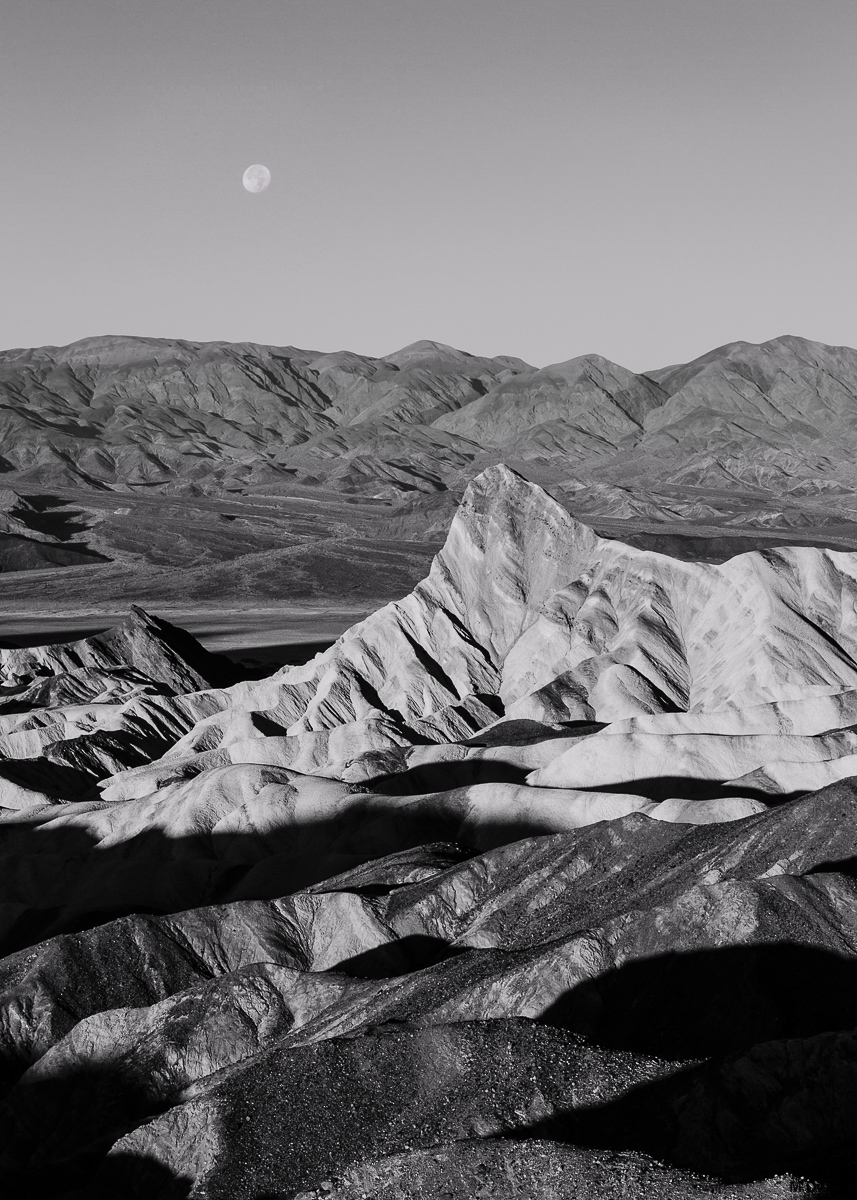
Here is a B/W conversion (using Nik SilverEfexPro2) of the original 35mm file form the "Manly Beacon Moonset" that I used with a longer FL moon to questionable effects.
As always, I'm eager for feedback, suggestions, etc. I tend to go easy on initial processing (with the exception of blends), so let me know if this needs more contrast, lifted shadows, etc. I am relatively new to b/w conversion (and a bit out of practice with processing in general), so don't hold back if you wish something were different.
Comments
12 commentsI really like the conversion you did and prefer this over the color. The tonal separation highlights the beacon and the moon is a nice added touch. Close moonscape and distant moonscape. I might crop a little off the top, but beautifully presented.
Really nice picture, I love the overall scene. B&W works very well here. I think the composition is good. I think the dark shadow in the foreground draws a bit too much attention though.
The tonal gradations in this image work better for me than the color image. The moon does show better in the color image but there are ways to emphasize in BW with Vivenza since it appears you have Nik filters should you wish to try this. I go back and forth with Topaz BW and Nik Silver Effects. Fred Miranda had a BW conversion program which I really liked because it di interesting tritones and bitones but I have been unable to get it to work with PS CC.
Here is another take on this one: I cropped a bit to reduce the amount of image in foreground shadow and worked on the moon more. I have another too, but the moon is a different focal length than the fg, so it might have that patched together look. I'll share it here too just in case, but I think that when I do focus length blends, I need to go for less difference between the two shots.
Maryylynnes, I prefer the repost. The dark area lower right still bugs me a bit, but it's less distracting than in the original.
You did a nice job with the conversion, and I prefer the B&W to the color image; although both are very nice. Now, you could do the old Ansel Adams trick of having a very dark sky. The moon would pop more. That's definitely a personal choice, though.
I've been enjoying your DV images.
--P
Marylynne, I really like the repost, but I also could buy in on the idea about darkening the sky. But not a nit, just another way of looking at things. Excellent solid image from this iconic spot in DVNP.
Thanks, everyone. I'm sold on working more on the B/W version. I think a horizontal aspect ratio is probably better (gets rid of the distracting foreground shadows and allows more lateral context for the formations. I attached one last variations here, one with .
Let me know if you like the new sky and crop or whether the vertical created some depth we lose in the horizontal.
Personally I like the repost as an alternate look here, Marylynne. However, the sky has some noticeable banding in it. So your process for darkening that area might be an issue.
A thought would be to try and repair the banding or just use the clean sky and try another approach. I use to get so much banding in my skies years ago for various reasons and I can't say I ever really knew why, but whatever change I made in my procedure eliminated the issue. To me, I see mostly red channel banding. Maybe just select the sky and turn down the red channel. Although I'm not sure it will completely fix the actual banding. If the colors can be made even, then adding noise at times helps hide the bands too. I've used all kinds of methods with little success. The best approach is make sure the sky is not tweaked too hard causing the bands.
Your original sky is so clean, maybe just start over on the clean sky would be less work.
EDIT: as a follow up thought did you try darkening the sky by just adding a black gradient layer? If you select just the sky without the moon and add the black gradient and then just change the opacity to a believable level. I doubt you'd get any banding doing that approach.......just another thought........good luck.
Thanks, Paul. I think I got it. I started fresh and didn't use the Nik -2 filter on the sky. That filter might be too heavy-handed. I also noticed that there was a tint applied to the noise reduction gradient I did on the sky. I had no intention of shifting the sky toward the reds, but between that and a saturation boost (probably a hold over in the gradient filter from another image), I think I really screwed up some color channels (hence the banding?)
Comment only if you feel moved to. You have all been so helpful already. This is the last edit I'll share here: less gradient, no tint or saturation, sky darkened in LR. I know this is better, but it might require another pass to get it print-ready.
Again, mucho gracias!
Much better and it looks very natural now.......
Yes, some of the plugins can get a bit heavy handed at times. I love my NIK software, but do very little B&W conversions. I find my niche in the Velvia color world......
I like that final version if you are going for the dark sky effect. I might clone out the bright white spot on that version just to the left of the Beacon.
Thanks, guys, and yes, I'll clone a couple things that stand out now that I have darkened some areas.