Nature Photographers Network
This is the preserved archive of the original Nature Photographers Network. The community continues at naturephotographers.network.
Another Sharpie
‹ PreviousAvian GalleryNext ›

Another Sharpie

by Dennis Plank

Gallery: AvianPosted November 12, 201584 views10 comments
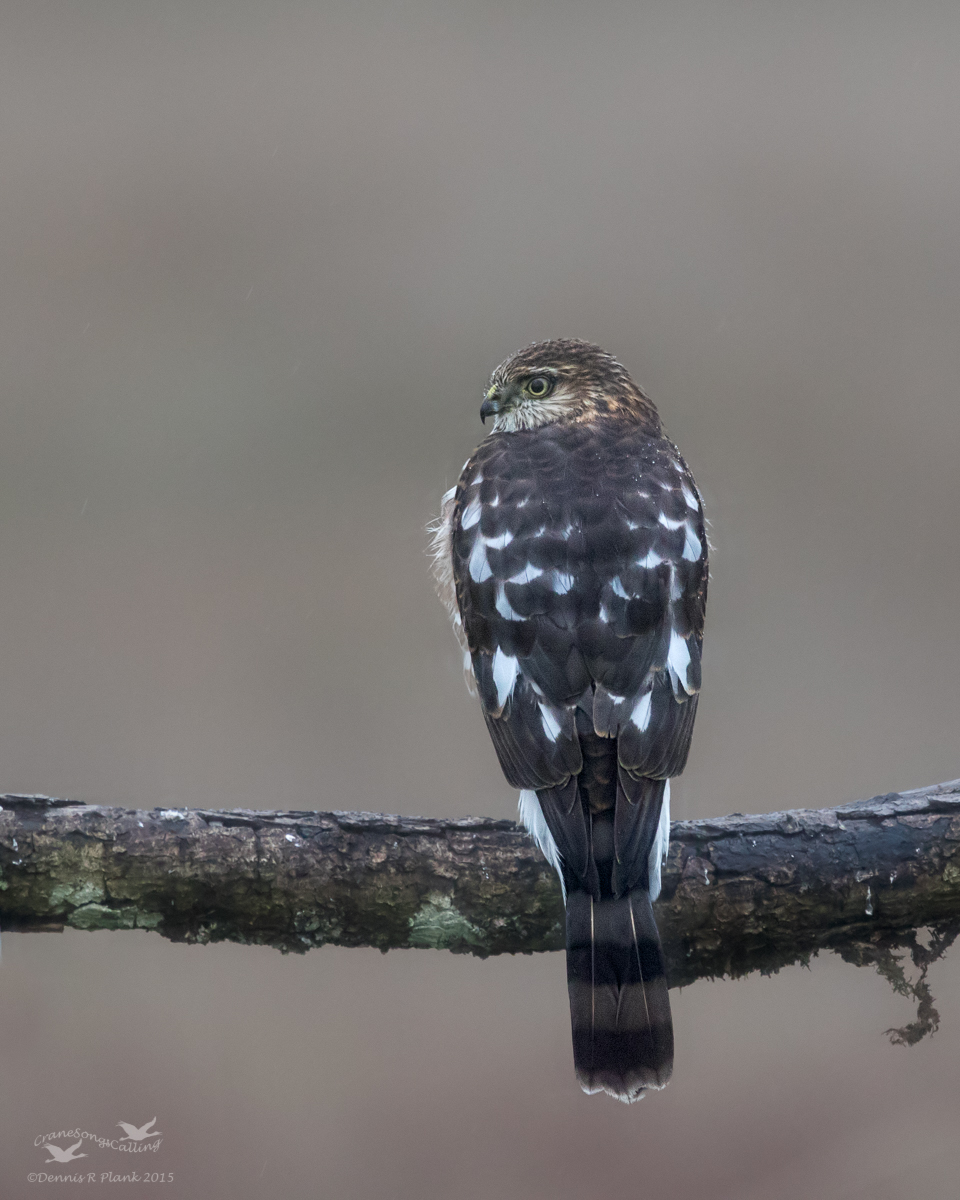
This is the kind of opportunity we seem to be given more often.  We've had one coming in to our feeder setup this fall to look for small birds, but it's much more skittish.  I ended up shooting through the screen on the back porch by putting the lens hood right against the screen.  This produced a very foggy looking image.  I used levels and curves in Photoshop to reduce the fog effect as much as possible.  I'll post a comment with a cropped, but otherwise unprocessed (except for conversion to JPG) image so you can see what it looked like.  I think the procesing turned it into a decent documentary shot for our bird log.

7Dii, Sigma 150-600 contemporary at 484 (not sure why I didn't zoom further wink-maybe I pushed it back in when I held it against the screen), hand held, f/6.3, 1/320, iso 1250, aperture priority, pattern metering.  Processed in LR5 & CS6.  Cropped to 6.86 Mpixels.  Taken November 5th at 10:29 am under cloudy skies.

I appreciate all the comments on my last Sharpie post and look forward to your thoughts on this one.  If anyone knows any tricks for processing an original like this, I'd be very interested in hearing about them.

Thanks,

Comments

10 comments
Comment posted by Dennis Plank on November 12, 2015 at 7:43 PM
Here's the "original".
Registered on January 28, 2008, 1767 Posts, 23192 Comments
Comment posted by Steve Thompson on November 12, 2015 at 8:00 PM
Wow Dennis, talk about pushing limits. That's a huge difference in these two images. I am surpised that you managed to keep the detail with shooting through the screen. Excellent job with the processing. Comp and background are pretty nice too.  devil
Registered on August 7, 2014, 125 Posts, 2319 Comments
Comment posted by Keith Bauer on November 12, 2015 at 8:26 PM
Dennis:  Nice work pulling the details out of the foggy image created by shooting through the screen.

I wondered what just a quick run using the DeHaze slider would do.  The result is a bit less contrasty than your result with the feather colors retaining more brown than pushing them towards black.  Thought it was an interesting experiment, and it took about 10 seconds to do.  I didn't bother with any NR which would have improved the background.
 
Registered on November 20, 2003, 458 Posts, 4836 Comments
Comment posted by Charles Gangas on November 12, 2015 at 9:21 PM
Excellent work in post Dennis, you really brought the bird out well-I would have never guessed you shot thru the screen. Also very neat to see what Keith was able to manage with the DeHaze tool, but I think I prefer your treatment. Aside from the variation of the color in the bird I also like the background in your composittion better. devil

 
Registered on August 12, 2009, 544 Posts, 2414 Comments
Comment posted by Dennis Plank on November 12, 2015 at 10:03 PM
Thanks, Keith.  I've heard about the dehaze tool recently but haven't tried it.  I think I'll give it a run with some noise reduction on one of the other images from this series to see what happens.  We do get a lot of haze here.
 
Registered on January 28, 2008, 1767 Posts, 23192 Comments
Comment posted by Jim Zablotny on November 12, 2015 at 10:31 PM
Hi Dennis,

The experiment provided an excellent result. You might be able to brighten it up just slightly to finish it up. Your result is close to ideal.  I photograph hummingbirds through an open sliding door and use a baby gate to keep the cats indoors.  I might try to do a couple shots through the screen......................................Jim
Registered on January 17, 2004, 705 Posts, 3594 Comments
Comment posted by Stephen Kaluski on November 13, 2015 at 2:32 AM
Hi Dennis, I quite like the overal concept, with the back of the bird illustrating it's beautiful plumage and head turn to the right. Killer backdrop and I also like the lichen perch, the wet has given a bit more character to the branch. I'm just not sold on the cropping Dennis, look a little unbalance for me???? I think/feel there is just a little too much space above juxtapose to below.

If anyone knows any tricks for processing an original like this, I'd be very interested in hearing about them.

I think you did well in the PP and the right route in the original capture, happy to take a look at the RAW to provide some pointers if that woul help Dennis.

TFS
Steve
Registered on March 25, 2007, 189 Posts, 1064 Comments
Comment posted by Hans Overduin on November 13, 2015 at 9:19 AM
Wonderful pose showing the nice pattern on the back. Perch and BG also work well for me. Great job, Dennis ! Cheers, Hans
Registered on August 31, 2011, 491 Posts, 3807 Comments
Comment posted by David Schoen on November 13, 2015 at 11:58 AM
Nice image, good discussion.  I think post processing has its limits when shoot through glass or screens but you have more than an acceptible image here.
Registered on November 6, 2006, 1213 Posts, 4587 Comments
Comment posted by Kurt Bowman on November 13, 2015 at 10:31 PM
I like the head turn, the backside view and the mossy perch. If it were mine, I might crop this a bit different. The space on top is the part which seems the most unbalanced to me, but if removed, you would need to then remove some from the left also. maybe going with a 4x5 vertical. I think you did a nice job in PP to get ride of the effect from the screen except but the colors still seem a little muted to me. Still, nice work Dennis.
Registered on June 19, 2008, 1005 Posts, 8028 Comments