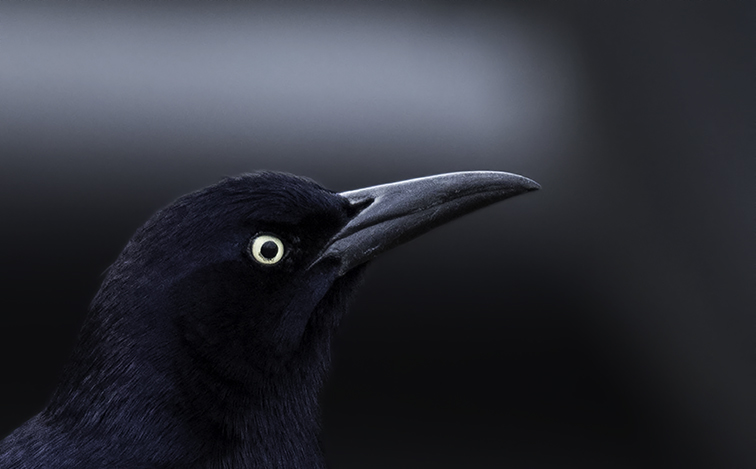
Grackle in Parking Lot
by Robert Ryan
Ridiculous irony. I was at PetSmart to pick up cat food and happened upon these blackbirds in the parking lot looking for a handout. The background was created thanks to a Ford F-150 pickup. I love the colors blending together but am afraid there isn't enough contrast (among several other concerns). This photo was taken in Folsom, CA. It is my first submission to this forum. I really want to make the photo good enough to print. All comments are greatly appreciated.
Photo specifics:
Nikon D810
AF-S NIKKOR 70-200mm f/2.8G ED VR II at 200mm
ISO 640
f/2.8
1/640
Aperture Priority

Comments
9 commentsFor some reason, your large image is the same size as your post size, but the bird has a definite blue iridescence. I believe this is a Common Grackle. This could well be how you want the print to look. I will point out that the larger image can have a maximum size of 1600 pixels x n and 1000KB. This size allows the critiquer to do a better job of critiquing.
I'm glad top see you started off with a critique. That, IMO, is the best way to learn and improve your skill. So, a good start! I look forward to seeing more of your work.
I like this very much - I'm a big fan of monochromatic color images. The darkness and tghew composition add a sense of mystery to the image.
As Phil says this looks fine on the monitor. I don't know if there's enough separation between the breast and the background for it to show well in a print, and that's likely a function of the type of paper you use.
You don't say if you shot this as a raw NEF file or a jpeg. If it is a raw file you have a greater ability to bring up the exposure a bit to reveal more detail in the darkest areas and that may help with printing.
You've already received some excellent feedback from Phil and Richard. I'll just add that a very light touch of dodging on the blackest part of the grackle's cheek and in front of its eye might bring this up another level if it brought out some feather detail while not "greying" the black too much. There's several ways you could do this, and I'm sure you already have a technique that works for you...I'll just suggest a duplicate layer which you can then mask your dodging and adjust the opacity (and possibly even blending mode) might do the trick.
This is a seriously cool image with great feel and graphic power so please accept the above as just a thought that might be worth taking a few minutes to explore.
Quite the fortuitous circumstances, too! Awesome job seeing and realizing the potential here.
Both the original and repost are very, very nice images with great impact. If this was shot on RAW I think you should have good information for a conversion that you can coax that detail out of while retaining nice deep blacks. As I mentioned in my original post, there are so many approaches that can accomplish this. If you happen to have Nik (Google) Color Efex 4 plugin, you could use a very light selectively-applied round of detail extractor. If you aren't familiar with that plugin, it can take a bit of getting used to to get things to have a subtle, natural look as the defaults are INSANE in my opinion. Honestly you seem to have accomplished what needed to be done with your approach, but for me the darkness of the rest of the bird is more dramatic in the original. We're splitting hairs between great versions here, Robert, so take this all with a grain of salt as they say.
I appreciate the followup immensely. I think you're right about the repost. The bird does have a bluish tint to it in reality but I don't really want that in this photo. I want to keep the darker cast with the touch up to the cheek. I will go back to the original, leave out the overall brightening and paint the detail into the cheek area. Then if I can only get it to print out as nice as it looks on the monitor I will be a happy boy.
Thanks again and I hope you feel better soon.