Nature Photographers Network
This is the preserved archive of the original Nature Photographers Network. The community continues at naturephotographers.network.
Joshua's Prayer + 3rd Repost
‹ PreviousLandscape GalleryNext ›

Joshua's Prayer + 3rd Repost

by Marylynne Diggs

Gallery: LandscapePosted April 13, 20162,017 views14 comments
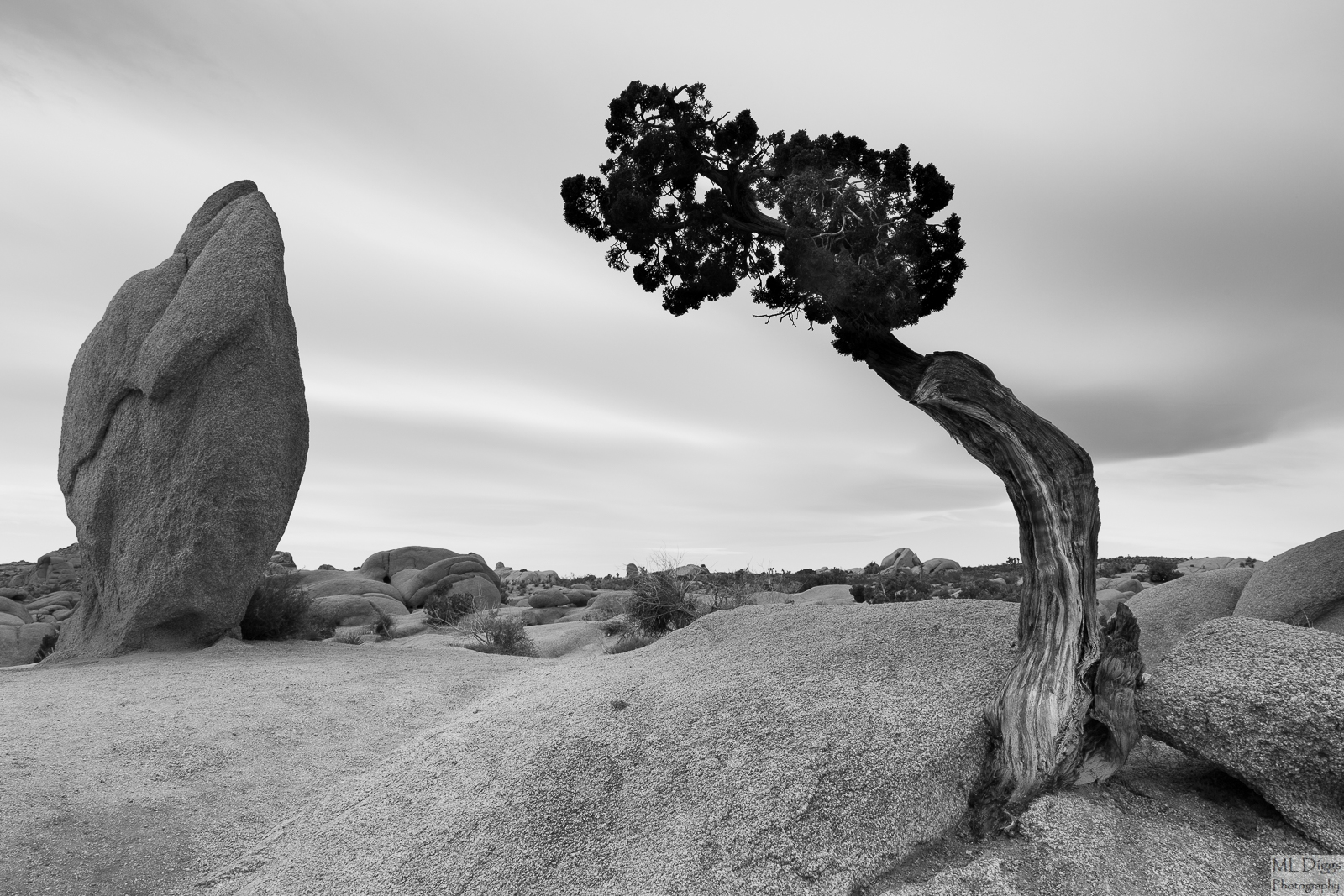
Camped on that really windy night in Joshua Tree a couple of weeks ago and awoke to some fast-moving, high clouds, but not particularly dramatic light. I have been in a b/w mode for a while, and sincerely saw most of Joshua Tree NP through b/w eyes.  Very strange experience as I used to be a color junkie.  

I'm interested in your thoughts on this one. 

One thing I'm noticing (and curious about) is the issue of chromatic abberrations in b/w conversions.  I've been eliminating CAs in color, then converting, but I have occasionally seen them return fairly prominently as a lighter gray border.  This image is stopped down to f/13 with the 24-105mm L at 24 mm.  Since switching to Full-frame ( 5D3 from the 7D), I'm wondering whether I should be shooting wider and cropping more to hit the sweet spot of the lenses, so I'm curious about folks thoughts on that as well.

Canon 5D3 with 24-105mmL at 24mm, f/13, 1/30s, ISO 125.
Thanks for your feedback.
ML

Comments

14 comments
Comment posted by Bill Chambers on April 13, 2016 at 4:46 PM
Very nice Marylynne.  I really like the composition and your choice to convert to B&W - works well here.  I see no problem with CA here on my small laptop.  I don't know if you used a noise control program but I expected to see a good bit of noise in the sky and I don't, so kudos for that too.
Registered on April 10, 2005, 753 Posts, 21216 Comments
Comment posted by Marylynne Diggs on April 13, 2016 at 6:19 PM
Thanks, Bill. I did the conversion in LR and used only LR's noise reduction functions.  The Sky was pretty clean and at 125 ISO, it didn't need much NR.  Glad to know the CAs are not visible to everyone. Maybe I'm just imagining them?
ML
Registered on December 14, 2010, 122 Posts, 1034 Comments
Comment posted by Sairam Sundaresan on April 13, 2016 at 7:55 PM
this is such a classic spot, and you've made a beautiful image! On my display, the top of the juniper seems to be abruptly black compared to the rest of the trunk. Not sure if that is something that resulted from the conversion. With the 5D iii that I have, I usually compose my shots with a little bit more room just in case I need to crop in. You can afford to do that with the extra megapixel count.  Alternatively, to hit the sweet spot of the lens, you could shoot at f/8 or f/11 and focus stack if that's something you're into. 

:)
Registered on March 14, 2013, 100 Posts, 643 Comments
Comment posted by Marylynne Diggs on April 14, 2016 at 11:25 AM
Thanks, Sairam.  I had tried to get a little more detail in the juniper, but I'm not sure it was necessary (and I didn't do it very well).  I think I've tweaked it to a better result.  The trunk of the tree is kinda funky: maybe remnants of a now-gone split trunk, etc.  So the part of the trunk just below the foliage is a little darker because it's further and shaded more.


I appreciate your catching that messy brush job devil.
ML
Registered on December 14, 2010, 122 Posts, 1034 Comments
Comment posted by Dave Dillemuth on April 14, 2016 at 1:18 PM
Marylynne,
Nice take on this location. I like your framing and the B&W rendering works well. Not seeing any issues with CA. If it were mine I think I would reduce the luminosity in the sky some and try to pull some more texture out of the clouds.

As for your move to FF - I always think you should strive to get the composition right during the capture. If your using Canon L lens' with proper technique they should be sufficently sharp across the frame to produce beautiful large prints. 
Registered on December 10, 2015, 104 Posts, 1112 Comments
Comment posted by Jean C Cajolet on April 14, 2016 at 9:39 PM
Very nice details, the subject as it's composed becomes very original. I like the B&W, a very nice work has been made, I love it as is. I don't see any signs of chromatic aberration. I had this lens when I was with Canon and between f/8 and f/11 and from 35 to 70mm, it was really good, for the one I had.
Registered on April 28, 2014, 53 Posts, 532 Comments
Comment posted by Lon Overacker on April 15, 2016 at 12:44 PM
Marylynne,

I really like the juxtaposition between the boulder and the tree. Definitely an odd tree, but so perfect for your composition. I like how they lean in towards each other.  The b&w looks great too, especially in the large version.

Speaking of the large version, I think this is another example of where the original posted image, the smaller version, doesn't look the same as the larger view.  Most notably the lack of detail in the upper part of the juniper in the small version.  When opening the larger version there is a bit more detail and just not all black. Even still, given the totally diffused light, I would have expected that tree to not be so dark up top.  But then again, the tree could be  light to dark, bottom to top naturally.

Not sure what to recommend on your full frame and CA question. To me it seems a shame to remove pixels from a larger, full frame and expensive camera.  Why go full frame if you're going to then choose to make it behave like a smaller sensor.  Of course it's a function of the lens, not the camera, but you're cropping to eliminate the CA.  I haven't been doing the dslr very long, but already found the CA removal in ACR to be pretty effective (although I can't speak to the subsequent b&w) conversion.  Just some .02.

Lon
Registered on November 24, 2006, 521 Posts, 19147 Comments
Comment posted by Marylynne Diggs on April 15, 2016 at 1:54 PM
Thanks, everyone.  RE the CAs,  I think I'm just pixel peeping more with my new camera ;-).  I might look into whether something is out of whack with the 24-105 lens (if it's just that lens, and not as bad on the 16-35mm, then it's clearly a lens issue).

Lon: The tree is a juniper, I think, and they do have orange-ish bark and very dark needles, but it was also softly backlit (sun rising in the distance where the sky is brighter. 

All: Is the darkness of the foliage a big distraction?  I can look at it again and see how much detail can be pulled out. In all honesty, I considered leaving it darker still (full silhouette).

ML
 
Registered on December 14, 2010, 122 Posts, 1034 Comments
Comment posted by D.A. Edwards on April 15, 2016 at 2:39 PM
A very pleasing comp, Marylynne, although the darkness of the tree did jump out at me immediately as there is virtually no black in the rest of the image. I thought at first that maybe you had a GND on but if you did I would imagine that would be showing up on the monolith in the BG. I guess that it is just a strange tree. The swoopy clouds do a nice job of tying things together with the rocks.
Registered on October 8, 2014, 226 Posts, 1187 Comments
Comment posted by Bill Leggett on April 15, 2016 at 5:08 PM
Lots to like with how you framed this.  The B&W conversion works very well.
Registered on July 21, 2004, 706 Posts, 3233 Comments
Comment posted by Marylynne Diggs on April 15, 2016 at 11:15 PM
Thanks everyone.  Something triggered when you said graduated filter. I did a diagonal LR graduated filter to get some contrast in the sky and burn down the highlights a tish, and of course, I stopped it just under the tree.  So, I deleted that filter, used the brush instead for the sky and went a littler harder there as suggested by Dillemuth, and applied a brush lifting the shadows more in the foliage.

Interested in whether this works better and whether I went too far on the sky.

ML
Registered on December 14, 2010, 122 Posts, 1034 Comments
Comment posted by Roel Wijtmans on April 17, 2016 at 1:17 PM
I thought this would be a long exposure due to the softness of the sky, but it's not. What a nice sky! Its simplicity adds to the overall simplicity of the comp, it's very appealing I think. I do think the top of the tree could use some more detail, but you have fixed that nicely in the last repo. I do think I prefer the original sky, which I consider more fitting for the scene.

I don't see any CA issue btw.
Registered on September 30, 2012, 116 Posts, 2257 Comments
Comment posted by Lon Overacker on April 21, 2016 at 2:08 AM
Marylynne,

Glad you made note of the 2nd repost so I could see what you had done.  I guess it was a good call on the light to dark transition on the trunk - a graduated filter! Of course. cool

At least for me, the juniper looks best in the latest repost - great work there, very natural given the lighting.  I like the treatment of the sky as well.

Now, since you're working hard on tweaking this one.  If this were mine, I would selective add a skosh of contrast to the main rock on the left - kind of matching the contrast of the rock on the right below the juniper. I'm not talking about exposure level - it's very mid-toned, but I'm thinking micro-contrast? if that makes sense. Very minor, but just one of those little tweaks that can be made to make an image the best it can be.
Registered on November 24, 2006, 521 Posts, 19147 Comments
Comment posted by Marylynne Diggs on April 21, 2016 at 11:48 PM
Thanks for the feedback, especially on the sky and increasing the micro contrast on the rock.  I tried to tone down that zebra sky back toward where it was and increase the micro contrast on the rock.  I think this hits things right.  If the sky needs to be between the poles I'm swinging between, let me know that too.
ML
Registered on December 14, 2010, 122 Posts, 1034 Comments