Gallery: FloraPosted January 31, 20171,289 views9 comments
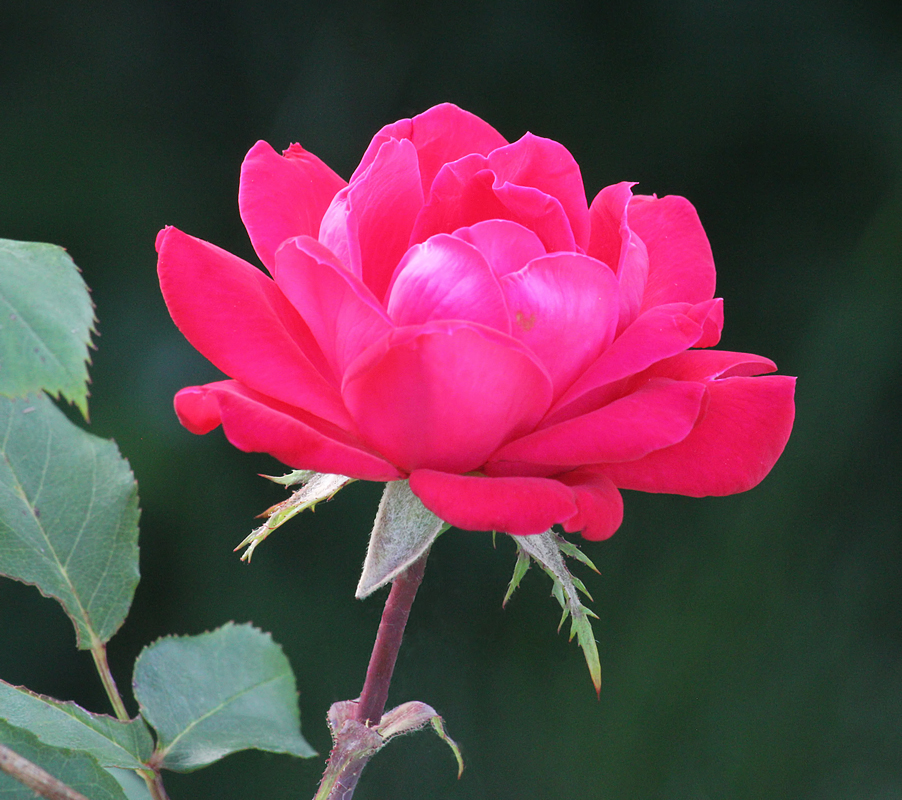
A rose from my front yard last June in late afternoon light.
Canon 60D, Canon 70-300@260mm, 1/125, -.3 step, ISO 1600, Topaz Denoise on background
I appreciate all comments and critiques.
Comments
9 comments
Comment posted by Bill Fach on January 31, 2017 at 12:36 PM
Barb: You're venturing into Phil's territory with this one. Beautiful portrait. >=))>
Registered on November 1, 2003, 1805 Posts, 26981 Comments
Comment posted by Philip Hodgkins on February 1, 2017 at 8:44 PM
A beautiful rose, Barb, but it looks like the red bled all over the detail in the petals. Red roses are my nemesis as well. Tough to get right. Some times I can get it right by desaturating the red about 10-15%, then lowering the luminance.
Registered on July 24, 2006, 2741 Posts, 12349 Comments
Comment posted by Giuseppe Guadagno on February 2, 2017 at 9:10 AM
The rose is splendid but the red is tricky. In LAB Mode it may be easier to lower the violet color in the central petals.
Registered on February 3, 2007, 827 Posts, 5052 Comments
Comment posted by Barb Pflaum on February 2, 2017 at 3:15 PM
Thank you, everyone, for your comments and suggestions. Here is a version incorporating Phil's suggestions. I don't think I have the right software to try what Gigi suggested. I also spot healed a couple of small brown spots that I hadn't noticed before.
Registered on January 14, 2009, 316 Posts, 2724 Comments
Comment posted by scott lanz on February 3, 2017 at 11:36 AM
As Phil noted, getting reds right is often a challenge, but the reds look good to me Barb, even in the original. I actually prefer the reds in the original. However, the greens look a little bright and flat to me. I mean the green leaves, not the bg, which is fine. Overall, a fine rose image, however.
Registered on November 14, 2003, 840 Posts, 12902 Comments
Comment posted by Philip Hodgkins on February 3, 2017 at 8:59 PM
Barb, If you are using PS, Go to Image in the menu dialog. Click on Mode, then down the list to Lab color. Then go to Curves. In the middle drop down box you will find Lightness, "a" then "b".The first explains itself, "a" controls red and green, "b" controls blue. Play with it a bit. You will find it a fairly easy tool. Another similar method is to stay in 8 bit or 16 bit mode, Then go separately to the red, green and blue channels in the Curves tool and modify those colors from there. If you use LAB, be sure to change it back to the original mode it was in before you save.
Registered on July 24, 2006, 2741 Posts, 12349 Comments
Comment posted by Barb Pflaum on February 4, 2017 at 3:35 PM
Thanks for the advice, Phil. I'm using PS Elements now, but I'm seriously considering getting PS in the near future, so I'll keep your advice in mind.
Registered on January 14, 2009, 316 Posts, 2724 Comments
Comment posted by Dennis Plank on February 5, 2017 at 1:36 PM
A very nice rose portrait, Barb. I actually like the original post. I think it might be a sky reflection on the center petals that's causing color issues, but getting colors right is still a problem for me as well. Glad to hear someone explain the LAB mode as I've heard of it but had no idea how to get to it.
Registered on January 28, 2008, 1767 Posts, 23192 Comments
Comment posted by SandyRichardsBrown on March 18, 2017 at 6:41 AM
Gorgeous rose! I actually prefer the first version, as well.
I appreciate Phil's mini-tutorial too - thanks, Phil!
For reds, and especially blacks and whites, I often recover details and "structure" using the "Viveza program" in the now-free Nik software. IMO, it does an amazing job, and I believe a lot of people here also use it. For the green leaves here, a "levels" adjustment would darken and perk them up.
A very lovely rose, deserving of a bit more work.
Sandy
Registered on November 24, 2003, 3937 Posts, 12909 Comments

Comments
9 commentsA very nice rose portrait, Barb. I actually like the original post. I think it might be a sky reflection on the center petals that's causing color issues, but getting colors right is still a problem for me as well. Glad to hear someone explain the LAB mode as I've heard of it but had no idea how to get to it.
I appreciate Phil's mini-tutorial too - thanks, Phil!
For reds, and especially blacks and whites, I often recover details and "structure" using the "Viveza program" in the now-free Nik software. IMO, it does an amazing job, and I believe a lot of people here also use it. For the green leaves here, a "levels" adjustment would darken and perk them up.
A very lovely rose, deserving of a bit more work.
Sandy