Nature Photographers Network
This is the preserved archive of the original Nature Photographers Network. The community continues at naturephotographers.network.
Denali B & W
‹ PreviousLandscape GalleryNext ›

Denali B & W

by Paula LeVay

Gallery: LandscapePosted August 6, 20173,709 views9 comments
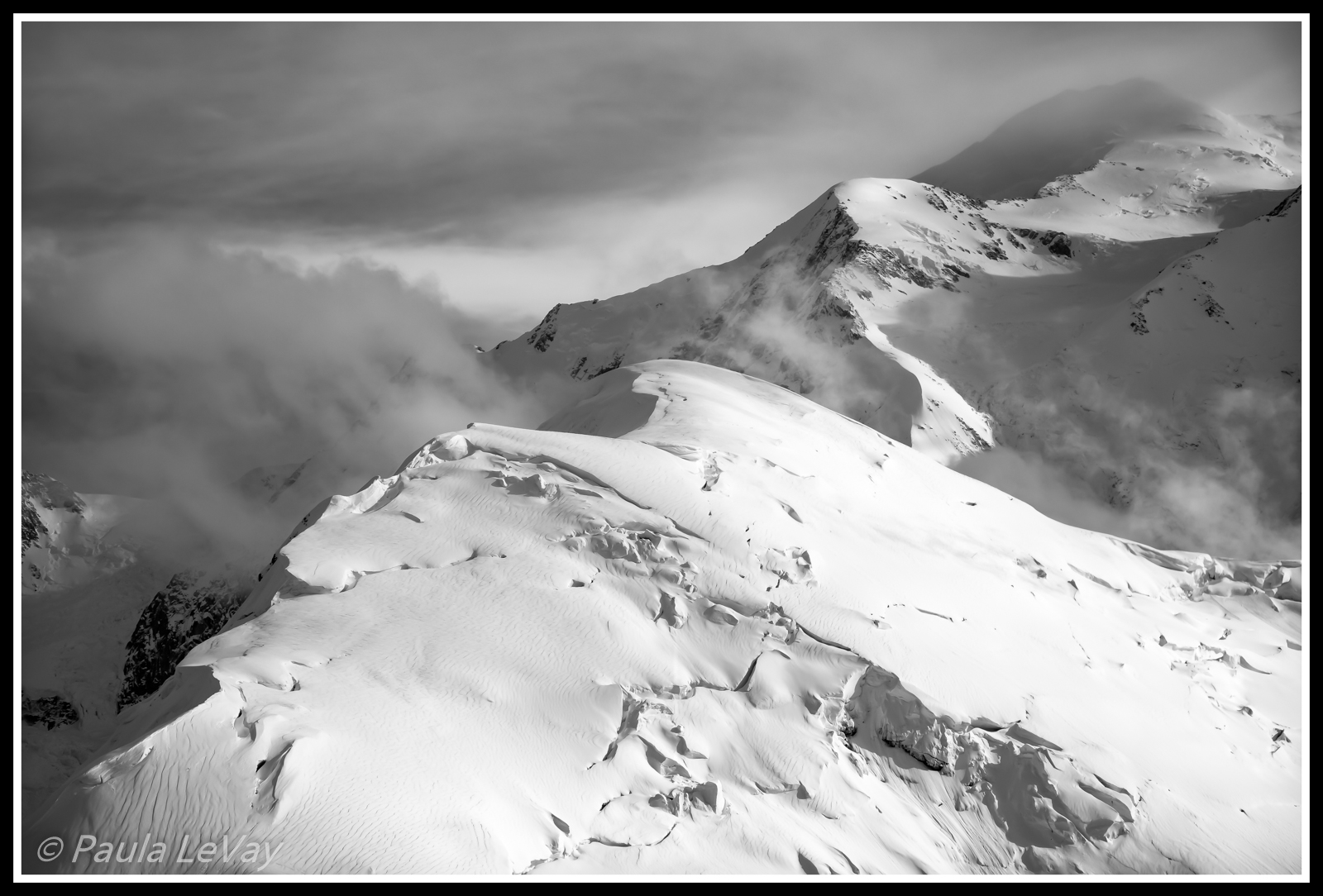
This is my favorite image taken during a flight around Denali in June because of the simplicity of detail and the strong diagonal lines of the mountain's ridges.   I've processed it using Lightroom and feel like I am somehow missing the mark because I am remembering the experience being much more dramatic than what is shown.  Thick window glass and limited processing skills I'm sure contribute to my disappointment in the scene, but your comments and suggestions for improvement would be greatly appreciated. 

5 D Mark III
24-105
f 8
1/1000
80 mm

 

Comments

9 comments
Comment posted by Wayne Bartz on August 6, 2017 at 1:09 PM
I really like this Paula. The B&W really conveys the starkness of the scene. For shooting through glass in a plane you captured a great composition, the larger version is fantastic. Great job.
Registered on May 12, 2007, 56 Posts, 92 Comments
Comment posted by Marylynne Diggs on August 6, 2017 at 1:47 PM
Hi Paula,
I think this is very dramatic. In my opinion (though I'm sure many photographers will disagree), some experiences are so awe- inspiring that an image can only approximate it.  I know that is always our goal as photographers, but sometimes I think that suggesting one can always capture everything with enough skill, planning, vision, and processing is akin to flying too close to the sun angel.  It's one of those things where, perhaps, with a GoPro camera and a motion-sickness-inducing I-Max screening, one could feel what you felt.  But then that's not still photography, is it!  I flew around Denali in 2002, and it is still one of the highlights of my life. 

That said, I am taken back to my experience looking at this rendition of yours. The mountain is so massive that it is hard to get an identifiable chunk of it in a frame when this close, so the drama is in the details.  Maybe you could consider creating a series that gets the whole experience since it might difficult to capture it in a single image.

I like it as presented, but there are a few things I think could make it pop a little, even with LR's B/W limitations:
1. Consider selectively darkening and lightening some of the clouds
2. If there is more at the bottom left where those snow drifts create dune-like ripples?  If so include a tish more there?  If not, maybe move your signature line to the right.
3. If there is a way to do a vertical crop here, it might provide the sense of verticality that one experiences from plane.

I'm eager to hear others' suggestions on it.
ML
Registered on December 14, 2010, 122 Posts, 1034 Comments
Comment posted by Dan Schwartz on August 6, 2017 at 3:43 PM
Do you have NIK software ( free from Google) Silver Effects Pro. It has a "structure" slider that may give you just that edge of detail and drama. I'm just a beginner, but Ive seen tutorials, and tried a few times, and that slider is like magic.
I really like your capture from a plane window - it's hard to do.
Registered on September 29, 2016, 23 Posts, 97 Comments
Comment posted by Bill Fach on August 7, 2017 at 12:03 AM
Paula: Marvelous majestic scene superbly composed and captured. Since much of this appears sunlit I think you could increase the brightness of the snow and boost the contrast for more impact. I don't do much B&W but I think this is a great subject for it and you're close. Keep 'em coming.
Registered on November 1, 2003, 1805 Posts, 26981 Comments
Comment posted by Nick Bristol on August 7, 2017 at 2:16 PM
Paula, I really like this shot and you came away with a great composition from that airplane window. The diagonal flow of the ridge line across the whole scene works very nice. Looks pretty darn good to me as is and a little tweeking might get it right where you want. I'm thinking that I would actually drop the highlites a little and then increase the shadows a bit. Maybe a little more contrast as well and just see how it looks. Curves in photoshop might be a good way to do it too. Might not work but easy to try. 

Nick Bristol
Lone Rock, WI.
Registered on February 1, 2004, 752 Posts, 14140 Comments
Comment posted by Paula LeVay on August 8, 2017 at 10:32 PM
 I've made several adjustments using Silver Efex Pro 2 and am feeling a little more positive about the results.  Thanks for the encouragement and suggestions!
Registered on July 29, 2016, 66 Posts, 270 Comments
Comment posted by Brian Schrayer on August 8, 2017 at 11:29 PM
I like this image, Paula.  I like the way that it showcases the scale of this massive peak.  At web resolution it looks sharp to me.  I definitely prefer the original post to the repost.  I don't care for the toning in the repost.  In the original file you have a good tonal range of bright higlights and deep blacks, but I could see increasing contrast a little in the midtones.
Registered on May 28, 2004, 114 Posts, 2890 Comments
Comment posted by Kathy Barnhart on August 16, 2017 at 6:03 PM
Paula,
This is pretty stunning, so the real thing must have been truly amazing. I agree that the tonal contrast in the midtones can be brought up. There is quite a difference in color between the first posting and the second, and I prefer the first. Not sure why, but the second one looks kind of brownish.

If you are all comfortable with Photoshop, adding a B and W adjustment layer is the way I favor doing my B and Ws. Then you can do various adjustments to specific areas in the image with masks and curves layers.

I've never tried getting a photo from a plane like this, so I say kudos to you for what you did get.
Registered on November 11, 2011, 404 Posts, 1639 Comments
Comment posted by Igor Doncov on August 17, 2017 at 3:20 PM
Some good suggestions have been provided. There are aspects of the 2nd image that are superior and some from the first. The bright snow in the first image is about perfect and is lost in the 2nd. The separation of mist from the bg shadow in the 2nd image, is superior. As suggested by others I would concentrate of making the misty clouds lighter while keeping the shadows the same. 
Registered on November 22, 2014, 189 Posts, 2733 Comments