Nature Photographers Network
This is the preserved archive of the original Nature Photographers Network. The community continues at naturephotographers.network.
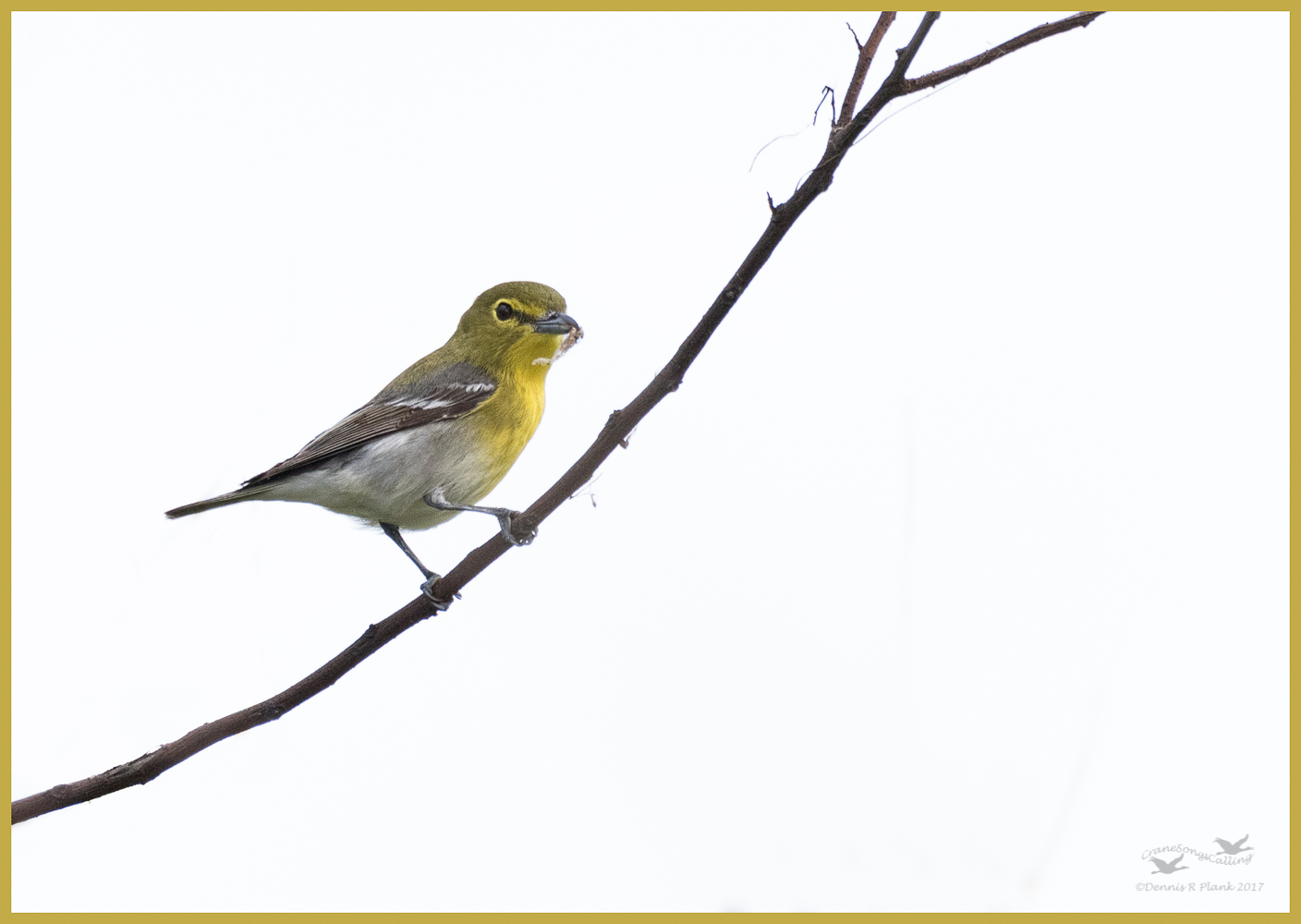
Yellow-throated Vireo
‹ PreviousAvian GalleryNext ›

Yellow-throated Vireo

by Dennis Plank

Gallery: AvianPosted October 2, 2017206 views8 comments
Going through files from my Texas trip this past spring and I found some images taken in the trees at the entrance to the Leonabelle Turnbull Birding Center in Port Aransas one day that I hadn't processed yet.  Not the best image quality since I was shooting against a white sky, but this is the only time I've seen this bird, so I thought I'd post it.  It gave me three decent poses and this was my favorite.

7Dii, Sigma 150-600 C @ 600 mm, hand held, f/8, 1/640, iso 1000, manual exposure.  Processed in LR & PS CC.  This is a pretty large crop and it was only 5.4 MP after cropping, but I think the bird itself held up pretty well.  Taken April 12th at 9:48 am. 

Your comments and critiques are always appreciated.

Thanks,

Comments

8 comments
Comment posted by Peter J. Morrissey on October 2, 2017 at 5:41 PM
Hi Dennis
The back=ground doesn't help any, but your Vireo looks nice.
Peter
Registered on July 3, 2011, 188 Posts, 969 Comments
Comment posted by David Schoen on October 2, 2017 at 7:07 PM
The large image certainly looks better.  Good color and detail.
Registered on November 6, 2006, 1213 Posts, 4587 Comments
Comment posted by Richard Ditch on October 3, 2017 at 12:22 PM
I like this even with the white sky - I never managed a shot of one of these local breeders in my NJ film days and would be happy to have taken this.

But with a little time in photoshop you can add some graduated color to replace the blank sky as I have done here with your permission.

My steps, starting from your jpeg:

1. duplicate the background layer so you have two.

2. Select the vireo and the branch in the upper layer and with it active click on the mask icon to turn the selection into a mask.

3. Pick a shade of blue that suits your concept of natural (I just picked a light blue swatch for this example).

4. Select the bottom layer.

5. Add a new blank layer that sits between the background and the copy with mask.

6. Use the gradient tool on the blank layer, using the selected blue at one end and a lighter blue on the other. This adds the color to the sky.

7. Use the opacity slider on the middle color layer to bring it down to a natural appearance based on your experience nad judgement.

8. Finally, if the result looks darker without the white sky you may want to lighten it overall with a curves layer pulled up in the middle.

I didn't spend much time on this example, so you can make it look better with a more careful selection and fine tuning the shades of blue used for the gradient.
Registered on November 1, 2003, 1031 Posts, 12705 Comments
Comment posted by Philip Hodgkins on October 3, 2017 at 2:45 PM
Classic BOAS comp, with a well resolved subject and a good head turn. I think I would make the thin stringy blue stems up and down the branch go away.
Registered on July 24, 2006, 2741 Posts, 12349 Comments
Comment posted by Dennis Plank on October 3, 2017 at 7:32 PM
Thanks for posting the process for creating a pleasant blue sky, Rich.  When I get home in a couple of days, I'll try to work this magic on ghe original and post it again.  I really appreciate you sending me this.

 
Registered on January 28, 2008, 1767 Posts, 23192 Comments
Comment posted by Norma Tareila Matl on October 4, 2017 at 8:04 AM
Dennis and Rich thank you for both, the nice image of the Yellow-throated Vireo, and the instructions for the background color change. 

I agree with Rich and Phil about those minor changes.  Would like to see how both look. Very nice capture of the bird. I do think the slight tint in the back ground helps to separate the bird in a more natural view. 
Registered on October 27, 2016, 229 Posts, 393 Comments
Comment posted by Shirley Freeman on October 4, 2017 at 3:15 PM
I downloaded Nik Google (it is free) and in the Color Efex 4 I was able to change to sky (not sure I picked the most natural blue), but just wanted to see how it would work for my own info.  Anyway, I tried it on your beautiful image of the Vireo.  See what you think.  I used Colorize and selected the sky.  I selected the bird and branch to not be cororized. 
Registered on May 27, 2017, 77 Posts, 844 Comments
Comment posted by Dennis Plank on October 4, 2017 at 9:01 PM
Hi Shirley.  The NIK colorize function looks like it would work pretty well with a little tweaking.  I do notice that it turned the white parts, like the wing bars, of the bird blue, but by applying it to a separate layer that would be easy to avoid.  Another neat trick.
Registered on January 28, 2008, 1767 Posts, 23192 Comments