Nature Photographers Network
This is the preserved archive of the original Nature Photographers Network. The community continues at naturephotographers.network.
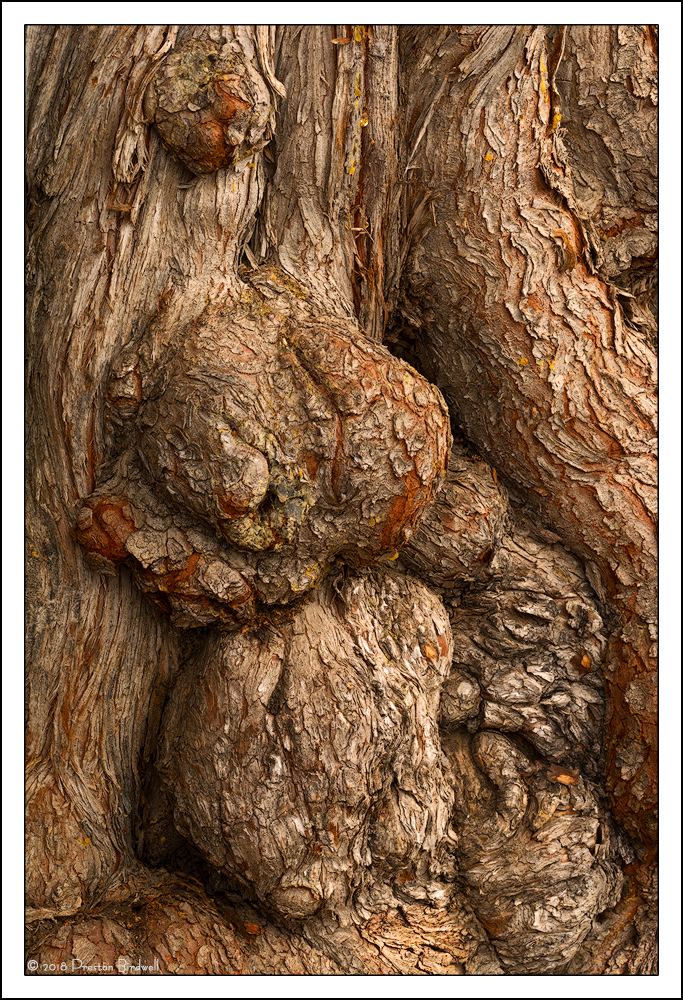
Burlz 2
‹ PreviousLandscape GalleryNext ›

Burlz 2

by Preston Birdwell

Gallery: LandscapePosted January 29, 20189,510 views12 comments
Thank you for your comments on my recent oak image.

Here is a different composition of the same tree I posted a few ago. I attempted to process this one as aclose as I could to the first image.

Nikon D-7100
Nikkor 70-200 @ 120mm
f-16 @ 1/25, ISO 200

Please see the large version. Thanks!

Your thoughts are always appreciated. cool
--P
 

Comments

12 comments
Comment posted by Bill Chambers on January 29, 2018 at 3:01 PM
I greatly prefer this composition to your previous one.  This has much more depth and life to it.  In comparison, the previous image was very static.  With a little imagination (or alcohol) I could see many different beings and creatures in this this version.  Processing is excellent too.  You say you tried to match the other, but I think this version is actually better because the bottom burl (center bottom) is rather discolored in comparison to the previous version and it matches and complements the remainder of the wood color in this version.  This is very nice, Preston.
Registered on April 10, 2005, 753 Posts, 21216 Comments
Comment posted by Nick Bristol on January 29, 2018 at 5:34 PM
Really interesting shapes with excellent color and amazing texture and detail. Really nice processing, Preston.

Nick Bristol
Lone Rock, WI.
Registered on February 1, 2004, 752 Posts, 14140 Comments
Comment posted by Kerry Gordon on January 29, 2018 at 6:35 PM
Hi Preston,
I really love this image and you have processed it to good effect.  The textures, subtle colour and depth you've brought to the image really draw me in and hold my eye.  The organic curves have an almost sexual appeal.  Nicely done.  Can you say something about your workflow.
Registered on January 29, 2018, 4 Posts, 18 Comments
Comment posted by Preston Birdwell on January 29, 2018 at 7:04 PM
Kerry, I see that your comment is your first post. Welcome to NPN! Thank you for your comment on my image!

My generalized workflow is the following:
  1. Open the RAW file in ACR
  2. In ACR, I may crop, reduce Chromatic Aberration, and adjust Clarity, and occasionally Highlights and Shadows, and color balance (if needed).
  3. I save the file as a Photo Shop PSD file (this is my Master File)
  4. Next, I open the file in Photo Shop-CC
  5. I usually create a copy of the Background layer and then use the Spot Healing Brush and perhaps the Clone Stamp to clean things up. Once done, I merge this layer with the background layer and save.
  6. I normally use Levels or Curves layers using Tony Kuyper's excellent Luminosity Masks for adjusting contrast
  7. On occasion I will use a black and White layer with the blending mode set to Luminosity to adjust the brightness of certain colors.
  8. Once I have contrast looking good, I adjust Saturation.
  9. When I am happy, I save this file.
  10. From my Master File I create the jpg files for posting. I use Tony Kuyper's Web Sharpening action to size and sharpen the images.
  11. Lastly, I save the images for uploading.

Like most things, there are many different ways to go about post-processing and preparing an image. Note, that I do not use Lightroom. If you do, I am sure there are folks here who can guide you.

Again, welcome to NPN. We look forward to your participation and seeing your work!
--P
 
Registered on November 1, 2003, 471 Posts, 5188 Comments
Comment posted by Ed Lowe on January 29, 2018 at 10:16 PM
So many lines and textures to savor and enjoy in the large version, Preston. I am also enjoying the color combination of reds and browns in the burls as they work beautifully together. I always find scenes like this are fascinating because of the wealth of details they hold. Really nice work here.

Ed
Registered on February 7, 2004, 414 Posts, 7115 Comments
Comment posted by Igor Doncov on January 30, 2018 at 12:47 AM
I do think that this is a stronger composition than the previous one. There are a few brighter yellow spots that attract your eye that I would clone out. They're not that significant though. This image is like a family portrait - of burls. 
Registered on November 22, 2014, 189 Posts, 2733 Comments
Comment posted by Lon Overacker on January 30, 2018 at 12:49 PM
Preston,

Amazing you could find an even better comp and arrangement on the same tree!  I too prefer this one, although they're both excellent.  Fascinating tree with the burls and you've captured and crafted this very well.  What's a bonus for me is that there doesn't seem to be any incongruent or disruptive elements; everything seems to be in place with no distractions.

Ok, this is getting really picky.... but the only suggestion I can think of would be to back down a tad on the highlights of the lower burl.  No biggie, hardly worth mentioning.

Lon

 
Registered on November 24, 2006, 521 Posts, 19147 Comments
Comment posted by David Schoen on January 30, 2018 at 2:30 PM
I also prefer this composition to the previous one and believe the color has a little more depth and richness.  Detail is superb.  Certainly a lot to look at in this image.  With respect to your workflow, it all makes sense.  I think the choice of using the Tony Kuyper luminosity masks is excellent.  This is a superb tool that I am still learning how to use effectively.
Registered on November 6, 2006, 1213 Posts, 4587 Comments
Comment posted by Igor Doncov on January 30, 2018 at 7:48 PM
Regarding your workflow -

It's a lot like mine but I'm starting to think that the crop should be one of the last things to be done. Very often I change my mind about it, or I even get a suggestion here on NPN for a modification. Then I have to do all the other processing again to reproduce the same image with a different crop. It seems natural to do the crop early on but now I'm thinking to fight that urge.

Also, Guy Tal in his latest book urges that all modifications after the master file be done as layers to a single file. It sounds logical enough but I never have the forethought to consider all the changes, nor the skill to do everything in layers. The changes come as I work. You would have to be a PS expert to see how it's all going to come out from the start.
Registered on November 22, 2014, 189 Posts, 2733 Comments
Comment posted by Ian Wolfenden on January 31, 2018 at 8:16 AM
I agree with others that this image surpasses the first, Preston, in its rhythmic quality.  Both have that `thingness' which seems to capture the essence of the tree.
Registered on May 18, 2007, 1108 Posts, 7647 Comments
Comment posted by Anil Rao on February 2, 2018 at 10:20 PM
Lovely, tactile and so very 3-dimensional. The highlights look beautiful on my monitor. A print of this photograph would be quite something. I hope to be able to see it one of these days.

Regards,
Registered on November 15, 2003, 234 Posts, 4923 Comments
Comment posted by Paul Breitkreuz on February 3, 2018 at 2:20 PM
Love the subject on this one, Preston. It really works nicely as a fine looking item for wall-hanging IMO. Subjectively thinking it is a couple points high on gamma on my monitor, but that is not any nit at all, just an item to mention from my POV. An excellent image....enlightened
Registered on February 25, 2006, 525 Posts, 8448 Comments