Nature Photographers Network
This is the preserved archive of the original Nature Photographers Network. The community continues at naturephotographers.network.
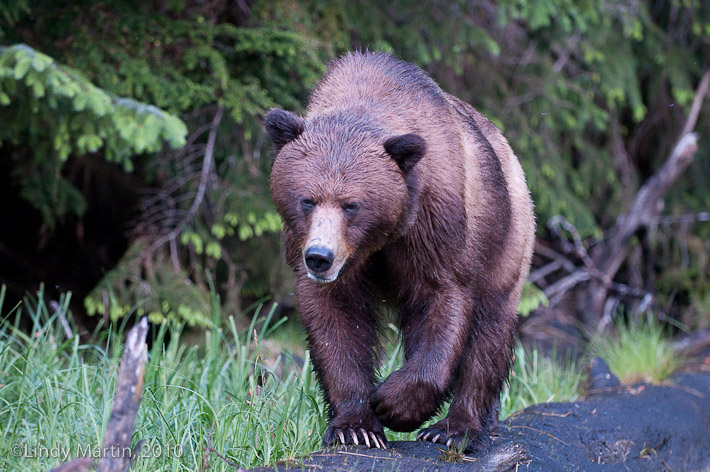
Catwalking Grizzly
‹ PreviousWildlife GalleryNext ›

Catwalking Grizzly

by Lindy Martin

Gallery: WildlifePosted March 14, 2011217 views7 comments
She walked just like a model on a cat walk. Unfortunately, it was just about dark - late dusk in lots of rain with the ISO cranked up to 1000 so I could capture her without a flash. It was great just to see her for real so a "not so great' photo is better than nothing. I don't do much post processing - what should I do with this image?

1/400th at 2.8 Nikon 70-200 ISO 100, Nikon D300 HH

Comments

7 comments
Comment posted by Richard Teller on March 14, 2011 at 9:14 PM
I am not the expert on post processing, I will leave that advice to those that are much better at that than I. But I will say I think you did a great job under the lighting circumstances.I like the composition, the mostly head on view and the lifted paw. Fine image.
Registered on August 23, 2010, 1162 Posts, 6692 Comments
Comment posted by Ed Cordes on March 14, 2011 at 9:46 PM
Great pose. The uplifted paw is excellent. On my monitor the WB seems off with a color cast in the blue range.
Registered on November 1, 2003, 451 Posts, 3366 Comments
Comment posted by Kurt Bowman on March 14, 2011 at 11:13 PM
Lindy, I think overall, you seemed to manage to do a good job on the post processing of this. I do agree with Ed though about maybe warming this up a tiny, tiny bit. I would not do much, otherwise, it won't look natural. My only other suggestion, is I might be tempted to crop this to a 4x5 and move the bear to the left side so it isn't so centered. But with basically no light, I think you did a great job.
Registered on June 19, 2008, 1005 Posts, 8028 Comments
Comment posted by Brad Hill on March 15, 2011 at 9:43 AM
Hi Lindy,

I like the raised paw and the "determined" look in the bear's eye. If this image isn't full frame (and you have room to work with) I'd crop some from the right (possibly adding the equivalent amount to the left side of the frame) AND add a little more room on the bottom.

There is a colour cast (producing a little too much red/magenta) that I think is related to the WB issues shot at high ISO's (I've experienced the exact same issue with that camera at high ISO's). My experience is that it's kinda tough to get rid of - I had to both tweak WB during raw processing and then selectively add some warming (using photo filters) in Photoshop.

Cheers...and I think this shot is WAY "...better than nothing" - definitely a keeper!!

Brad
Registered on May 29, 2007, 431 Posts, 6061 Comments
Comment posted by Wayne Willison on March 15, 2011 at 2:56 PM
Lindy, a poweful image.
I agree with moving the subject to the right. I also would remove the oof partial branch in the left foreground. As to the cast, if you did not shoot this in raw as Brad mentioned, then simply go to Levels and click where it says, RGB and select Red. Once there, move the left hand slider in a bit. And you might also move the Blue in a bit.
Registered on April 10, 2009, 292 Posts, 3967 Comments
Comment posted by Gary Gulash on March 15, 2011 at 8:28 PM
Love the eye level view. I might have tried a vertical here if time allowed. You did a great job getting this nice and sharp in the low light. My first reaction would have been to increase the iso a bit when confronted with the low light, but you had decent shutter speed even at 100 iso.
Registered on January 28, 2005, 879 Posts, 12098 Comments
Comment posted by Joel DeYoung on March 15, 2011 at 9:08 PM
Nicely done image Lindy. Love the raised paw and the look the bear is giving you. As others have stated, there is a blue cast in this image. An easy fix.
If you have Photoshop, create a curves layer, select the blue channel (ctrl +3) then adjust the curve until you see these numbers, 110 output, 155 input. That should take care of the blue cast nice and quickly. :smile:
Registered on July 12, 2009, 92 Posts, 1074 Comments